
How to Change and Reset Your Ford Keyless Entry Door Code
How to Change Your Ford Door Code in 2026
If you drive a Ford F-150 or Explorer, chances are you count on it for more than just commuting. Whether it is hauling tools to the jobsite or loading up the family on weekends, your truck or SUV works hard, so your keyless entry system should too.
Being able to unlock your vehicle with a code is one of those features that feels small until you really need it. Forgot your keys? Hands full? Engine running while you grab something inside? The keypad is there for all of it. But if you are still using the factory-set code, it may be time to make a change.
Updating your door code adds a layer of security and convenience. Here is how to change the door code on a Ford, how to reset it if needed, and what to do if you ever get locked out.
Quick Answer
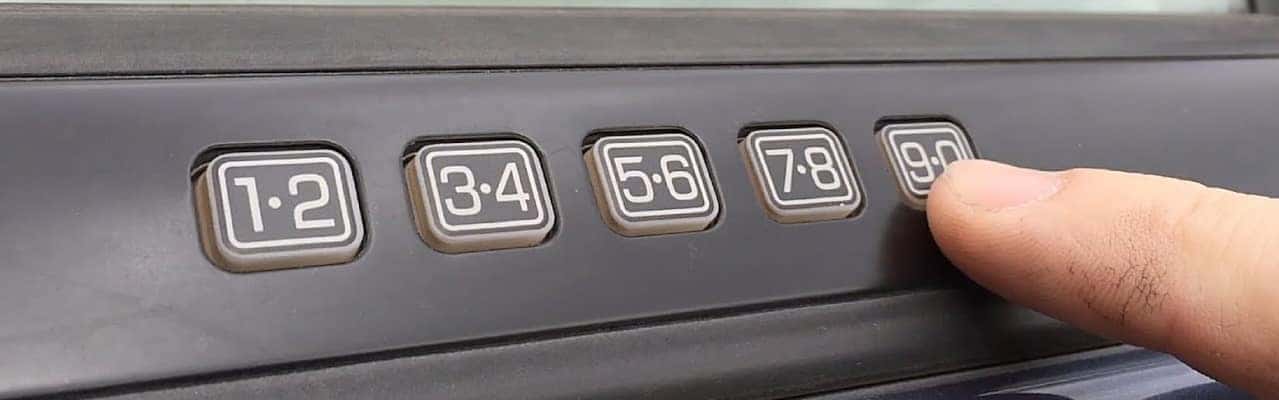
To change your Ford keyless entry code, enter the factory five-digit code, press 1•2 within five seconds, enter your new five-digit code, then press 1•2 again to save it. If accepted, the doors will lock and unlock once.
Why Change Your Door Code?
Every Ford with a SecuriCode keypad comes with a five-digit factory code. It is printed on a card when the vehicle is new, and it is permanently stored in the onboard computer. That code never goes away. It is useful to keep, but relying on it for daily use is not ideal, especially if you bought your vehicle used or share it with others.
Setting your own personal code gives you something easier to remember and harder for someone else to guess. You can program up to five personal codes on most Ford models, so your spouse, kids, or coworkers can each have one too if needed.
How to Change a Ford Keyless Entry Code
Most Ford F-150 and Explorer models use the same basic keypad process. Here is how to program a new code using the door panel.
Step 1
Enter your factory-set five-digit code on the keypad.
Step 2
Within five seconds, press the 1•2 button.
Step 3
Enter your new five-digit personal code.
Step 4
Press 1•2 again to save it.
If the code is accepted, the doors will lock and unlock once. That confirms the new code is active. You can still use the factory code as a backup. It stays in the system permanently.
Want to add more than one code? Use the same steps, but instead of pressing 1•2 to save the second or third code, press 3•4, 5•6, and so on to assign each one to a different slot.
How to Reset a Door Code on a Ford
If you have forgotten your personal code or want to wipe them all, you can reset the system. This does not change the factory code. It only erases any additional codes you have added.
- Enter the factory code.
- Press and release 1•2, then press and hold it for two seconds.
- The doors will lock and unlock to confirm that all personal codes are erased.
Now, only the factory-set code will work until you add a new one.
How to Find the Factory Code
The factory code is the key to everything. If you have lost it or never received it, there are a few ways to find it.
Check the Glove Box
If the previous owner or dealership kept things organized, the code may be printed on a wallet card inside the Owner’s Manual packet.
Look for the BCM Sticker
On many F-150 models, it is behind the passenger-side kick panel. Some Explorers have it behind interior trim in the cargo area.
Use Two Programmed Keys
On newer models, insert the first key and turn the ignition on without starting, then repeat with the second key. If supported, the code may appear on the dash or touchscreen.
Visit a Ford Dealer
If nothing else works, a Ford dealer can retrieve the code using a diagnostic tool. Bring your registration or proof of ownership.
Using SYNC or the Touchscreen to Set a New Code
Some newer Ford models let you manage codes right from the touchscreen. If your F-150 or Explorer has SYNC 3 or MyFord Touch, you can change or add codes through the Settings menu under Vehicle > Door Keypad Code.
You will still need the factory code to start, but after that, it is a quick and easy update with no need to use the keypad at all.
What to Do If You Are Locked Out
If you are locked out and do not remember your code, try the FordPass app. If your truck or SUV has FordPass Connect and is set up properly, you may be able to unlock it with your phone.
Without FordPass, your best bet is to recover the factory code using one of the methods above or visit a Ford service department to retrieve it.
To avoid this problem in the future, set a personal code you will remember and keep a copy of the factory code stored somewhere safe, ideally not in the glove box.
How to Choose a Secure Door Code
When it comes to setting a new code, steer clear of the obvious stuff. Avoid using 12345, repeating numbers, birthdays, or house numbers. Anything someone else might easily guess is not a great choice.
Instead, combine something meaningful to you with a bit of variation. Think of a short pattern you will not forget but would not need to write down. It is also smart to update your code from time to time, especially if you think someone else may have seen it.
Need Help with Your Ford Keyless Entry Code?
If you are having trouble setting your code or recovering the factory one, our service team at Biener Ford is here to help. We can walk you through the process or retrieve the code using Ford-authorized tools.
Your Ford should work as hard as you do, and that includes locking up right.

15 comment(s) so far on How to Change and Reset Your Ford Keyless Entry Door Code
I dont known my factory code
If you don’t know your factory code, here are a few ways to find it:
How can I change the factory code. I bought thecar used and its the only code I was ever given. I was also never told I could assign more codes. Now my ex keeps going in my car and taking things. I dont have the funds to have it changed through the dealer. Please help.
First, one important thing to know: the factory door code can’t be changed. It’s permanently stored in the vehicle’s computer.
The good news is you can add your own personal code (and use that instead), and on most Ford models you can also erase any personal codes that may have been added previously.
To add your own personal code:
To erase any personal codes that might already be programmed:
If successful, the doors will lock/unlock to confirm the personal codes were erased. After that, you can program only the code you want.
Well I Locked My Key In My 2012 Ford Expedition, I Had To
Call AAA,I Just Don’t Want That To Happen Again.
I am about to swap driver side door to my Ford Taurus limited 2013. My question is do I 1) and how to 2) change the code so that the new door accepts the code underneath my steering wheel.
You usually don’t need to change anything. On a 2013 Taurus, the factory keypad code is stored in the vehicle’s computer (not the door), so after a driver-side door swap the replacement keypad should still accept your original code as long as the wiring and connectors match and everything is plugged in correctly. If the keypad doesn’t respond after the swap, it’s typically a harness/connector or keypad compatibility issue, not a code issue. You can still add a new personal code anytime by entering the factory code, pressing 1•2, entering your new 5-digit code, then pressing 1•2 again to save it.
If you want, tell me whether the donor door is from another 2013 Taurus (and whether the keypad lights up), and I’ll point you in the right direction fast.
Buen dia, se me quedo la llave dentro de mi maverick 2023, no sé el.codigo de la puerta, estoy muy lejos de casa. Podrian ayudarme por favor?
Buen día, sentimos que esté pasando por esa situación.
Si su Ford Maverick 2023 está configurado con FordPass, la forma más rápida de ayuda es usar la app en su teléfono para desbloquear el vehículo de manera remota. En muchos casos, eso resuelve el problema de inmediato.
Si no tiene FordPass configurado y no conoce el código de fábrica del teclado, ese código solo puede recuperarse con herramientas autorizadas de Ford y verificación de propiedad.
En este momento, la opción más segura es contactar asistencia en carretera o acudir al departamento de servicio de un concesionario Ford cercano. Ellos pueden ayudarle a recuperar el acceso sin dañar el vehículo.
Para evitar que vuelva a suceder, le recomendamos guardar el código de fábrica en un lugar seguro y programar un código personal una vez que tenga acceso al vehículo.
Si lo desea, el equipo de servicio en Biener Ford puede ayudarle a recuperar el código y configurar todo correctamente cuando le sea posible visitarnos.
good evening,
Just received a ford F150 Lariat vehicle from an outside source, the only key is a standard one to unlock doors, start truck.
I used the factory code to change to a personal code, no problem until i tried to windows, door locks – no response. radio works regardless of ignition on/off.
Good evening, and congratulations on the F-150 Lariat.
Based on what you’re describing, this does not sound like a keypad programming issue. If the truck accepted your personal door code, the keypad system is working normally.
When the radio works but the windows and power door locks stop responding, that usually points to a separate issue such as a blown fuse, low battery voltage, or a module/power distribution concern.
A few common causes we see on F-150s:
Quick step you can try: check and reseat the fuses related to power windows and door locks, and make sure the battery connections are clean and tight.
If the issue continues, the best next step is to have the vehicle scanned for BCM-related fault codes. Even without warning lights, the truck can store codes that point directly to the cause.
If you’d like, our service department at Biener Ford can take a look and diagnose it properly so you’re not chasing the problem blindly.
I just bought a car from the auction and I have no clue what’s the door code and I locked myself out the car
That’s a tough spot to be in, especially right after buying it.
If you don’t have the factory door code, there’s no way to guess or reset it from outside the vehicle. The code is permanently stored in the vehicle’s computer.
If the vehicle is equipped with FordPass and it was already set up, you may be able to unlock it through the app. If not, your best immediate option is roadside assistance so you can regain access without damaging the vehicle.
Once you’re back inside, you can locate the factory code in a few possible places:
If you need help retrieving the factory code after you regain access, our service team at Biener Ford can assist you with proper ownership verification and get you set up with a personal code so this doesn’t happen again.
I need the factory code I just brought this 2014 for expedition for the keyless entry
Congratulations on your Expedition.
For your 2014 Ford Expedition, the factory keyless entry code is built into the vehicle and can’t be changed, but it can be retrieved a few different ways:
Once you have the factory code, you can set your own personal code that’s easier to remember.
If you’d prefer not to dig into panels, our service team at Biener Ford can quickly retrieve the code for you and help you get everything set up properly.